

Issue 4 | April 2026
AI is designing running in the background, managing workflows, learning your preferences, and embedding itself into the infrastructure your company already runs on.
Anthropic launched Claude Design. OpenAI released GPT-5.5 and landed a major AWS partnership. Google renamed Looker Studio back to Data Studio. Snowflake’s Intelligence platform got a personal agent layer. Databricks shipped Lakeflow Designer and made governance AI-native. Power BI brought Copilot to mobile.
This isn’t the future of AI anymore. It’s just April.
Here’s our breakdown of what shipped, what it actually means, and what’s worth your attention.
Anthropic
Anthropic updates, April 2026
Claude Design
Anthropic had a busy April.
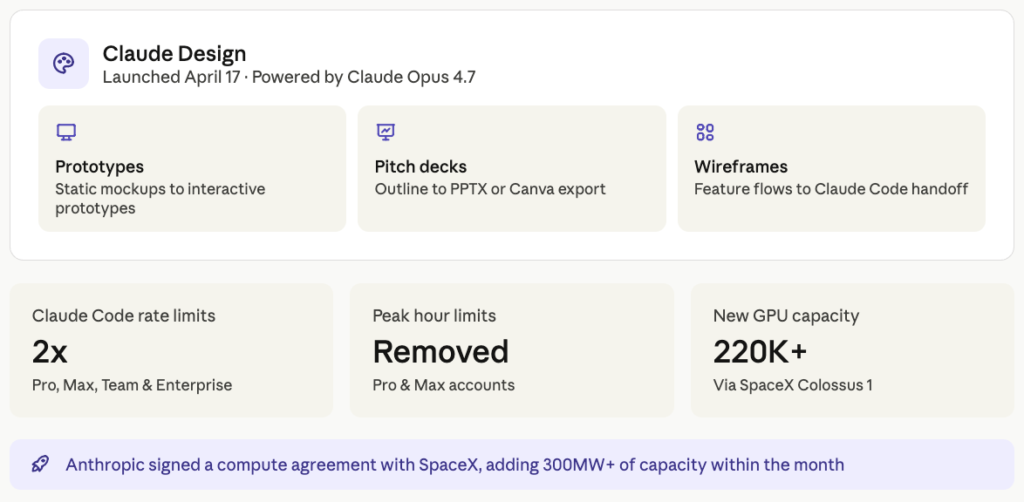
On April 17th, they launched Claude Design, allowing you to create prototypes, wireframes, pitch decks, marketing assets, and full design explorations powered by Claude Opus 4.7, their most capable vision model. Designers can turn static mockups into interactive, shareable prototypes without touching a codebase. Product Managers can sketch out a feature flow and hand it straight to Claude Code for implementation. Founders can go from a rough outline to a complete, on-brand deck in minutes and export it as a PPTX or send it directly to Canva.
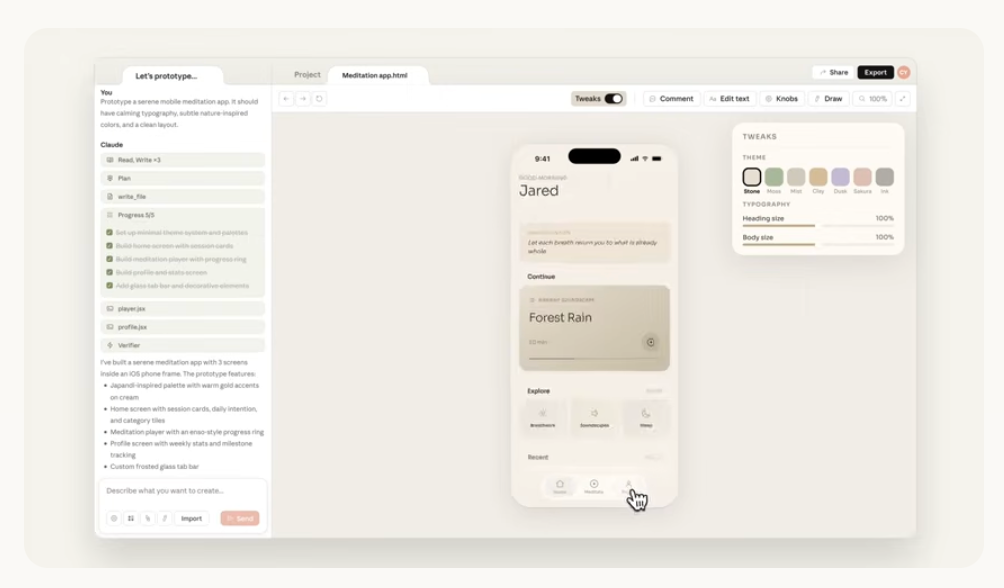
Introducing Claude Design by Anthropic Labs
There are already multiple tutorials on YouTube on how you can get the most out of it, but there’s still no official course from Anthropic itself.
What makes it interesting is who it’s aimed at. It’s for anyone who’s ever been stuck waiting, or who’s had a good idea but no way to show it to anyone else quickly. Marketers, PMs, founders, account executives.
Additionally, there are also new connectors announced for creative tools. You can learn more about them here – https://www.anthropic.com/news/claude-for-creative-work
Usage limits
And then, because our newsletter comes fashionably late this month, we can also include what Anthropic dropped at the start of May. Claude’s usage limits got a significant upgrade.
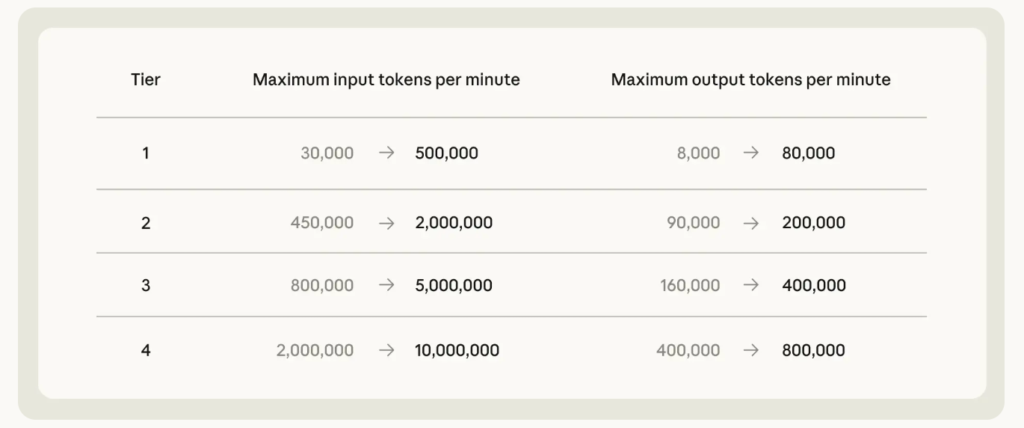
Claude Code new Usage limit, April 2026
Claude Code’s five-hour rate limits are being doubled across Pro, Max, Team, and Enterprise plans. Peak hours limits on Claude Code are being removed for Pro and Max users. And API rate limits for Opus models are being raised considerably.
Anthropic signed an agreement with SpaceX to use the full computing capacity of their Colossus 1 data centre. If you’ve been hitting limits doing serious work in Claude, those are great news!
OpenAI
OpenAI updates, April 2026
GPT-5.5
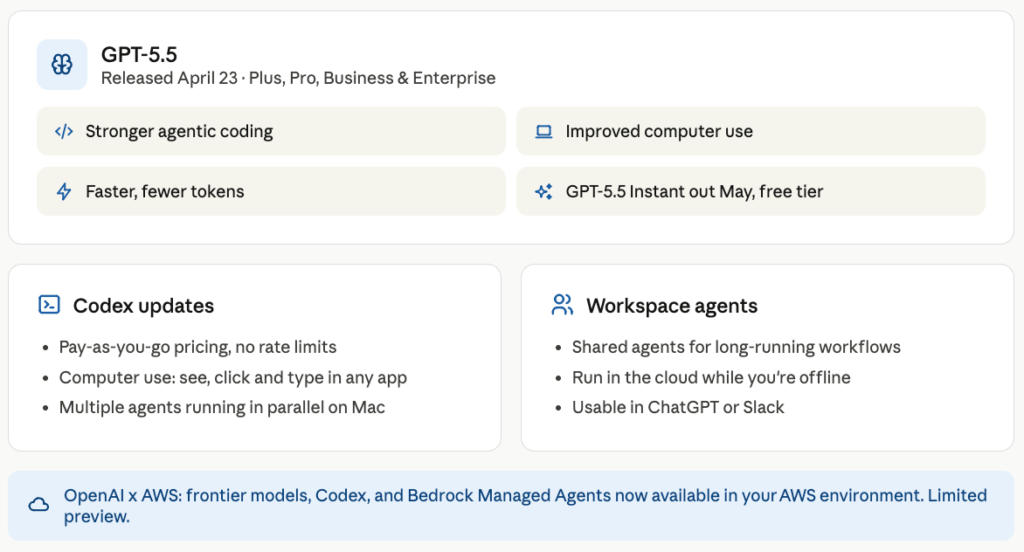
OpenAI released GPT-5.5 on April 23rd, and the way they’re framing it is “here’s a different way of working.”
GPT-5.5 is designed to handle messy, multi-part tasks without needing careful hand-holding at every step. You give it a complex, ambiguous goal, and it figures out what needs to happen, uses the right tools, checks its own work, navigates through uncertainty, and keeps going until it’s done.
It handles the same difficulty tasks faster than GPT-5.4, using fewer tokens. It’s also better at parsing out what you actually want from a vague or messy prompt and turning it into a plan. GPT-5.5 is available now for Plus, Pro, Business, and Enterprise users in ChatGPT and Codex, with GPT-5.5 Pro rolling out to Pro, Business, and Enterprise. And a lighter version, GPT-5.5 Instant, arrived in early May as the new default model with reduced hallucinations in sensitive areas like law, medicine, and finance, and the ability to search past conversations, files, and Gmail for more personalised answers.
Codex updates & Workspace Agents
Alongside GPT-5.5, OpenAI also made some changes to Codex, especially if your team is using it at scale.
First, pricing. Codex now offers pay-as-you-go for teams, with Codex-only seats billed on token consumption and no rate limits. If you’ve been on a fixed seat model and struggling to predict costs, this gives you a clearer view of usage versus spend and makes it easier to track what’s being consumed across different workflows and budgets.
Second, can now see, click, and type across all the apps on your computer with multiple agents running in parallel on your Mac without getting in each other’s way. Developers can iterate on frontend changes, test apps, and work in tools that don’t expose an API, without switching context.
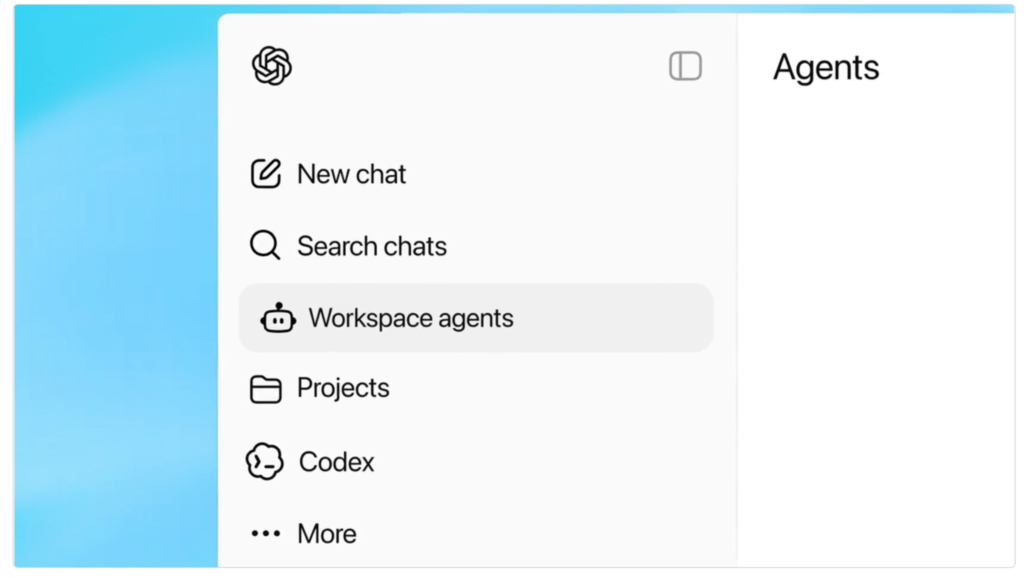
And third, workspace agents are now available. You can create shared agents that handle complex, long-running workflows, operate within the permissions and controls set by the organisation, run in the cloud so they keep working even when you’re not, and can be used collaboratively in ChatGPT or Slack.
OpenAI x AWS
And then at the end of April, OpenAI and AWS announced an expanded strategic partnership.
The short version: OpenAI’s models, Codex, and managed agents are coming to AWS. Enterprises can access frontier models within their existing AWS environment, security protocols, and compliance frameworks.
Codex on AWS, bringing the coding agent into AWS workflows directly. And Amazon Bedrock Managed Agents, powered by OpenAI, which is probably the most interesting one, you can run OpenAI-powered agents through Bedrock, the same way you’d run any other managed agent, with all the governance and controls that come with it.
The practical implication is that if your company has been hesitant to adopt OpenAI tools because of data residency, compliance, or vendor consolidation, those friction points have just got smaller. You no longer have to leave your AWS environment to use them.
Snowflake
Snowflake’s April updates are a good example of a platform filling in the gaps between what AI can do in a demo and what it can do in production.
The headline is Snowflake Intelligence getting a proper personal agent layer. It now learns your individual preferences and workflows over time, and business users can describe a multi-step process in plain English and have the agent execute it autonomously. Think recurring reports, approval workflows, forecasting routines, the kind of stuff that currently lives in someone’s calendar as a recurring task.
On top of that, new MCP connectors for Google Workspace, Jira, Salesforce, and Slack mean the agent can actually reach into the tools your team uses every day, not just the data inside Snowflake.
For builders, Cortex Code got broader ecosystem support this month. New connectors for AWS Glue, Databricks, and Postgres, plus native integrations with VS Code and Claude Code. If your team works across a hybrid data landscape, this makes Cortex Code significantly more useful as a development environment rather than something you have to context-switch away from.
A couple of features also moved out of preview and became fully available for production use this month. AI_COMPLETE document intelligence now lets you process and query documents directly inside Snowflake using AI, without moving them elsewhere first. And medical and health data classifiers are now available too, which is an update for anyone working in regulated industries where sensitive data classification has to be airtight.
Power BI
April’s Power BI update is a bit lighter than March, but there are a few things worth paying attention to.
Up until now, Copilot on the Power BI mobile app was mostly a useful but standalone experience disconnected from the reports you were looking at. You can open a report on your phone, tap Copilot, and have a proper conversation about it. Ask follow-up questions, drill into specific numbers, and get a plain-language summary of what a chart is telling you. For anyone who spends time reviewing reports away from their desk, this is genuinely useful.
On the modelling side, Direct Lake now supports calculated columns and tables, in preview. This is a meaningful gap being filled; up until now, calculated columns weren’t available in Direct Lake mode, which meant some teams had to fall back to import mode for models that needed them. That workaround is no longer necessary for most use cases.
A couple of smaller things: visual labelling in the visualizations pane now tells you upfront whether a visual is production-ready or still experimental, which is helpful in enterprise settings where report governance matters. And the base theme switcher makes it easier to toggle between modern defaults and previous themes without losing your custom design work.
One deprecation to be aware of if you haven’t already acted on it. The legacy Excel and CSV import experience from the Power BI service is being phased out. Entry points are being removed at the end of May, and existing semantic models built that way will stop refreshing at the end of July. If your team is still using that workflow, now’s the time to move it over to a Desktop-based approach.
A question for you
Every tool in this newsletter shipped something that reduces the gap between having an idea and doing something with it. Claude Design means you don’t need a designer to show what you’re thinking. Workspace agents mean you don’t need to be at your desk for work to keep moving. Lakeflow Designer means you don’t need to write a pipeline to build one. Snowflake’s personal agent means you don’t need to remember which recurring report lives where.
And that’s mostly good. But it also means the things that used to slow you down, the back and forth, the waiting, the handoffs, were also the moments where you caught mistakes, asked questions, and made sure you actually wanted what you were building.
So grab your rubber duck and have that conversation. Or take a colleague for a coffee and talk it through:
What would your team do with an extra hour a day if the tools handled the rest, and are you ready for that?