

If you work with Power BI, you know that DAX has a way of becoming one person’s problem.
Just because it takes long enough to get good at that, you may end up with a single person who can actually write it confidently, and everyone else queues up behind them.
Claude Code, working directly within your Power BI project via VSCode and GitHub, changes that dynamic. Once it’s properly set up with your PBIP files, anyone on the team can describe what they need in plain language and get a working first draft back, DAX that references your tables, relationships, and model.
That’s what this article is about: what the connection enables, what it doesn’t, and what a setup that holds up in production looks like.
Why is this different from asking ChatGPT to write DAX
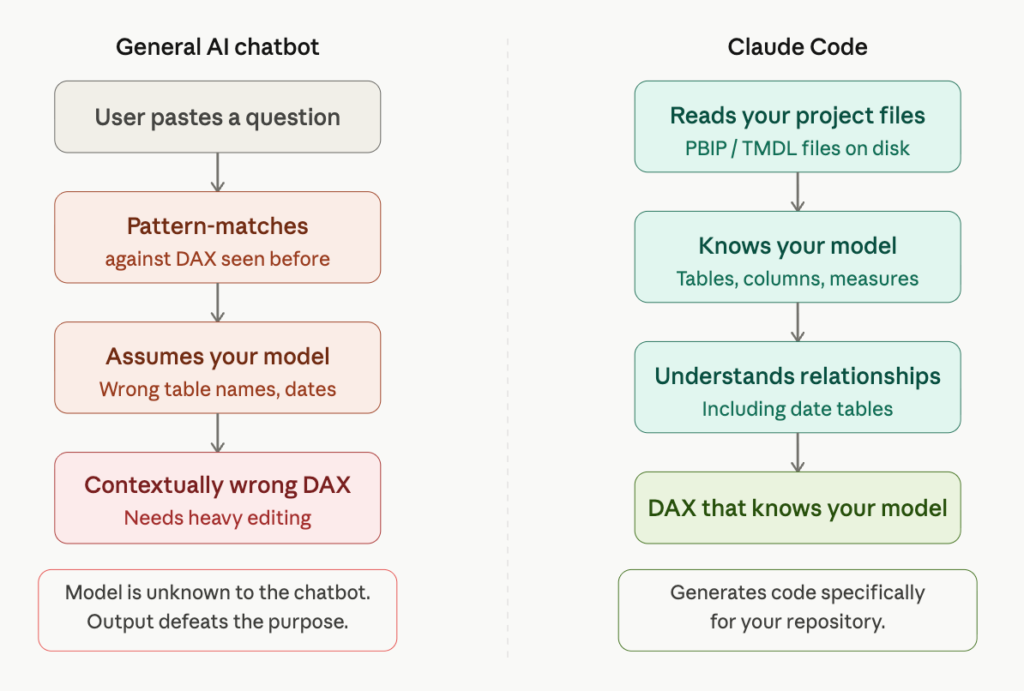
The first thing most people try when they want AI to help with DAX is pasting a question into a general-purpose AI chatbot. Sometimes it works. More often, it produces DAX that is contextually wrong, using table names that don’t match yours, assuming a date table structure that differs from yours, and ignoring important relationships.
The problem is that the chatbot does not know your specific model. It is pattern-matching against DAX it has seen before. The output requires significant editing by someone who knows DAX well, which defeats the purpose.
Working directly in your project files changes this. Claude Code reads your PBIP/TMDL files before generating anything. Your table names, column names, relationships, and existing measures are all there in the repository. When it generates DAX, it is generating code that knows about your model specifically.
What the connection looks like technically
Claude Code works directly inside your Power BI project using the PBIP/TMDL format. This means your full model definition, including tables, relationships, measures, and reports, lives as readable files in the repository, the same way a dbt project does.
Claude reads that structure before generating anything. When it writes a DAX measure, it references your tables and relationships. Everything generated goes through a pull request before it touches your environment.
What can you do with Claude Code connected to Power BI
Let’s be concrete.
Here are the scenarios where you can find the most value after setup.
Writing new DAX measures: Claude Code reads the model, identifies the relevant tables and relationships, and generates a measure that reflects the structure. The developer reviews it, tests it, and adjusts if needed. The hard part, getting to a working first draft, goes from an hour to a few minutes.
Understanding existing measures: Every Power BI team has measures that nobody fully understands anymore. Complex nested calculations written by someone who left, with no comments and no documentation.
Claude Code can read an existing measure, explain in plain language what it is doing step by step, identify potential issues, and suggest simplifications. This alone is worth significant time for people inheriting models they didn’t build.
Power Query transformations: The M language behind Power Query is useful and largely unpleasant to write by hand. With Claude Code connected, a data analyst can describe a transformation, ‘split the address field into street, city, and postcode, handle the cases where postcode is missing’, and get working M code.
Data model planning: When building a new reporting area, Claude Code can take a description of the reporting requirements, what dimensions, aggregations, and time intelligence are needed, and suggest a table structure with relationships.
Bulk documentation: Some measures have no description fields, columns have cryptic names, and the only person who knew what ‘adj_rev_excl_fx’ meant retired two years ago. Claude Code can work through an existing dataset systematically, read the DAX expressions, and generate descriptions for measures and columns, giving you a documentation foundation in hours.
Where are the boundaries of setting up Claude Code in your Power BI?
Being clear about what Claude Code does not do is as important as what it does.
Claude Code does not push changes directly to a published Power BI dataset.
The workflow is generation: Claude Code produces the DAX or M, a human reviews it, and it gets applied through the normal Power BI development process. Everything goes through a pull request.
If you skip the review step because the output looks good enough, you will eventually publish incorrect measures to production, and DAX errors in production reporting are the kind of thing that undermines trust quickly.
The connection also works best with well-structured models. If your table names are three-letter abbreviations and your measures are a pile of undocumented nested calculations, Claude Code will still produce technically valid code, but it will be harder to verify, harder to maintain, and more likely to contain subtle errors.
The setup is a good moment to address naming conventions and documentation gaps because the return on the AI connection is higher when the model is clean.
Taking it further: MCP integration
Those who want a live connection between Claude Code and their Power BI tenant can set this up via MCP, using the Power BI REST API (available on all workspaces) or the XMLA endpoint (Premium workspaces only). This gives Claude access to metadata beyond what’s in the files, such as published dataset state and richer structural context. It requires credential management and a service account, which we cover in a follow-on engagement. For most, the file-based setup covers the majority of day-to-day use cases.
i-spark runs a one-day setup sprint for those who want Claude Code properly connected to their Power BI environment, configured for your project, tested against your datasets, and handed over with a walkthrough.